
We’re a web design company in Port Charlotte that serves all of Southwest Florida. Today we want to show you why Nextcloud Hub is worth a look. With Nextcloud, your team can edit documents together, share files, run calendars and hold video calls. Your data stays on servers you pick. You get the perks of online teamwork without handing your files to a big tech platform.
At its core, Nextcloud is a private cloud server. It syncs files across all your devices, so it works like your own Google Drive for storage and sharing. It also has built-in office editors and a long list of apps. Host it with your favorite cloud service provider, like AWS, Google Cloud, Rackspace or Akamai (formerly Linode). Or run it on a server in your own office.
Think of it as a shared drive plus a work hub, built on open source code. It runs on Linux, and you can add apps as your needs grow. The team ships a new major version every four months, so the platform keeps moving.
So whether you need a private cloud for a small office or a family, Nextcloud covers the basics well. The trade-off is simple: you gain control, and you take on upkeep. We’ll cover both sides below.
Plan Long Term For Your Data And Productivity Platform
Old IT systems drain time and money. According to IEEE Spectrum, companies and governments spent an estimated $35 trillion on IT from 2010 to 2020. About three-quarters of it went to running and fixing systems they already had. At least $2.5 trillion went to replacing old systems, and about $720 billion of that was lost on failed projects.
At Vontainment, we’ve seen how painful old systems can be for small teams. That’s one reason we like open source tools. You don’t pay license fees, you can see the code, and no single vendor can lock you in. If a project ever stalls, the code is still there for someone else to carry on.
An open source work platform also saves you from a forced move every few years. You upgrade in place instead of starting over. As a Port Charlotte company, we also help with local SEO and the rest of your online presence. Let us help you tune your IT so it runs lean and saves you money.
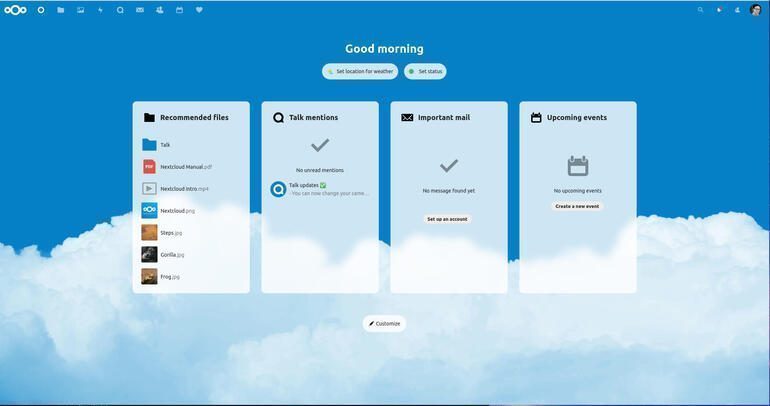
What’s New in Nextcloud Hub 26 Summer
We’re a web design company in Port Charlotte, and we keep an eye on the tools we recommend. The current release is Nextcloud Hub 26 Summer, which came out on September 16, 2026. Here’s what stands out for a small business:
- Teams app: set up a shared space for a group, with its own folder, owners and boards.
- Talk updates: channels, announcements and new classified conversations for sensitive topics.
- Office on the desktop: a Euro-Office desktop app for Windows, macOS and Linux.
- Assistant: faster AI replies, text reading from images (OCR) and reusable skills.
- Photos and Calendar: a new photo grid, plus a room finder that shows which rooms are free.
Nextcloud puts out a new major version every four months. Each one gets about a year of fixes, per the official release schedule. So plan to upgrade at least once a year. As a local web design team, we know that skipped updates cause most of the trouble we see.
Want to learn how we can help your business with Nextcloud, web design or hosting? Feel free to contact us. We’re happy to offer a free consultation. Already on an older release? Check that it’s still on the supported list before you add new apps.
A Smarter Nextcloud Search
Unified search looks across the whole platform from one box. Results come from files, chats, mail, calendars and the other apps you’ve installed. If you connect outside tools through integration apps, such as GitHub, those can show up too.
That makes a real difference once your team has a few years of files. You type once and find the file, the chat or the meeting. Nobody has to remember which app they used.
More Nextcloud Talk Connections
Talk is the chat and video tool built into Nextcloud. You get group chat, audio and video calls, screen sharing and phone dial-in with the right backend. Talk can also bridge a chat room to outside services. That runs on Matterbridge, an open source relay, through the Talk Matterbridge app.
The Nextcloud Talk page lists bridges to services like:
- Slack
- IRC
- Microsoft Teams
- Matrix
- Mattermost
- Other Nextcloud Talk servers
Matterbridge itself also supports these services:
- Zulip
- Mumble
- Rocket.Chat
- Discord
And it lists a few more, which we’d test before you rely on them for work:
- Gitter
- XMPP
- Keybase
- SshChat
- Telegram
- Twitch
Full Productivity Platform
Nextcloud Office now runs on Euro-Office. That suite is built from the open source ONLYOFFICE code, which Nextcloud and its partners cleaned up and now develop on their own. Collabora Online is still an option if you prefer it. Both run on your own server, so your documents never pass through a third party.
Because the editor sits inside Nextcloud, you can work on files alone or with others. That includes other users on your server and anyone who opens a public share link.
Powerful Spreadsheet Editor
Sort and filter your data online in XLSX, ODS and CSV files. Use a large library of formulas and build clear charts.
Beautiful Presentation Builder
Share your ideas in slides with charts, shapes and images. Save them as PPTX or ODP, or export them to PDF.
Complete Document Writer
Open, edit and co-write DOCX, ODT, PDF or Markdown files in real time. Comments and tracked changes come built in.
Nextcloud Gives You Access To All Your Files Wherever You Are
Where are your photos and documents right now? With Nextcloud, you pick the server: in your office, in a data center or at a hosting provider. That’s where your files live. Nextcloud runs on that server, guards your data and lets you reach it from a desktop or phone. It can also connect to storage you already have, like an FTP server, a Dropbox account or a NAS.
Share With Others On Your Terms
The web interface lets you share files with other users on your server. You can send public links locked with a password and an end date. Clients can upload files to a folder you set up for them. When someone on another Nextcloud server shares with you, an alert shows up on your phone and desktop.
Nextcloud Mobile and Desktop Clients
Free apps for Android, iOS, Windows, macOS and Linux sync your files over an encrypted link. On your phone, the app can upload new photos and videos on its own. On a laptop, you can sync only the folders you pick. Every app handles more than one account and alerts you to new shares and comments.
How We Set Up Nextcloud for a Small Office
For most small teams, we start with Nextcloud All-in-One (AIO). It’s the official install method. It runs in Docker and bundles the database, cache, HTTPS, Office, Talk and a backup tool in one package. Updates happen from a simple admin page instead of a long list of commands.
Here’s the order we work in:
- Pick the home. A cloud server for remote teams, or a machine in your office if most work happens there.
- Size it. We check the official system requirements, then add room for Office and Talk.
- Lock it down. HTTPS, two-factor login for every user and strong share settings.
- Back it up twice. One nightly backup nearby and one copy far away.
- Test a restore. A backup you’ve never restored is only a hope.
In Southwest Florida, that off-site copy matters. A hurricane can knock out power and internet in your office for days. If your server lives in the office, keep a synced copy in a data center outside the storm path. Your team can then keep working from wherever they land.
Who Nextcloud Isn’t For
Self-hosting isn’t free of work. Someone has to apply updates, watch disk space and check backups. If nobody on your team can own that, and you don’t want to hire help, a hosted suite may suit you better. Nextcloud also won’t match every Microsoft Office macro or complex Excel model, so test your key files first.
Is Nextcloud Right for Your Business?
If your business needs a file or collaboration platform, contact us to talk through your options. We’ll help you decide if Nextcloud fits, and set it up so it stays updated.
Nextcloud FAQ
Yes, the software is free and open source. You still pay for the server, storage and your time. Nextcloud also sells Enterprise plans with support if you want a vendor to call.
Apply the monthly fix releases as they come out. Move to a new major version at least once a year, since each one gets about twelve months of support.
For file sharing, calendars, chat and everyday documents, it can for many small teams. Email needs a separate mail server, which Nextcloud Mail connects to. Test heavy spreadsheets before you switch.
A cloud server is easier to keep online during storms and outages. An office server gives you fast local access and full control. Many teams use both, with one syncing to the other.



 Call Now