
At Vontainment, we’re a web design company in Port Charlotte that serves all of Southwest Florida. We’re big fans of a tool with a funny name: Pi-hole, a DNS Server you run on your own network. It blocks ads, even inside apps. It can prevent malicious sites from loading, and it can make browsing feel faster. Pair it with the right upstream setup, and you also get content filtering and private lookups.
The Pi-hole® is a DNS Server sinkhole. When a device asks for an ad or tracker domain, Pi-hole answers with a dead end. It shields your devices from unwanted content, and you don’t have to install anything on them.
- Resolute: blocks content in places outside the browser, like ad-heavy phone apps and smart TVs
- Responsive: makes everyday browsing feel faster by caching DNS answers
- Lightweight: runs on very little hardware, from a Raspberry Pi to a small VM
- Solid: a command line tool and a REST API for scripting and other systems
- Insightful: a clean web dashboard that works on any screen, so you can view and control your Pi-hole
- Versatile: can also act as a DHCP server, so every device on the network gets covered on its own
- Scalable: can handle hundreds of millions of queries on server-grade hardware
- Modern: blocks ads over both IPv4 and IPv6
- Free: open source software that keeps you in control of your privacy
What’s New in the Pi-hole v6 DNS Server
Pi-hole v6 came out on February 18, 2025, and it’s the biggest rebuild in the project’s history. If you set up Pi-hole years ago, a lot has changed under the hood. Per the official v6 announcement, here’s what’s different:
- Built-in web server and REST API: both now live inside the pihole-FTL program. Pi-hole no longer needs lighttpd or PHP.
- One settings file: the old config files merged into a single, well-commented
pihole.toml. - A redesigned dashboard: settings split into Basic and Expert modes.
- Subscribed allowlists: pull in lists of domains to allow, the same way you add blocklists.
- Native HTTPS: use your own certificate or let Pi-hole make one.
- A smaller Docker image: it’s now based on Alpine Linux.
Upgrading from v5 is usually smooth, but custom lighttpd or PHP tweaks won’t carry over. Back up your settings with the Teleporter tool first.
Pi-hole DNS Server Dashboard and Stats
Notable Dashboard Features
- Mobile friendly interface
- Password protection, with app passwords for API access
- Detailed graphs and doughnut charts
- Top lists of domains and clients
- A filterable and sortable query log
- Long-term stats for any time range you choose
- Easy ways to manage and set up Pi-hole features
Stats You Can Track
- Number of domains blocked in total
- Total number of DNS queries today
- Total number of queries blocked today
- Percentage of queries blocked
- Unique domains
- Queries forwarded (to your chosen upstream DNS server)
- Queries cached
- Unique clients
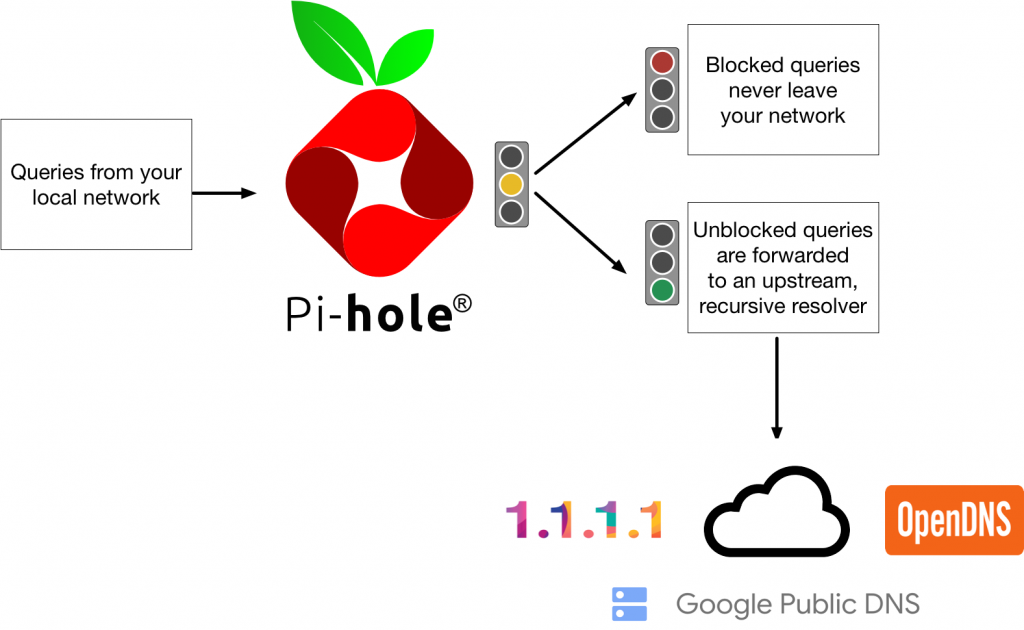
How Pi-hole Protects Your Network
Why Use DNS-Over-HTTPS?
A standard DNS server sends your lookups in plain text. Anyone on the path can read them, and some can tamper with the answers. That’s how people get sent to fake login pages. DNS-Over-HTTPS (DoH) wraps those lookups in the same encryption your browser uses for secure sites.
Pi-hole doesn’t encrypt its own upstream lookups. You add a helper for that. The Pi-hole docs used to point to cloudflared for DoH. As of their latest update, that feature is deprecated, and they no longer advise it for new installs. For a new setup, we use unbound as a private resolver or another supported DoH proxy. Keep in mind that any upstream provider can still see the lookups it answers.
Your DNS Server as a Content Filter
Pair a Pi-hole with a router or firewall that can redirect DNS, like a Ubiquiti EdgeRouter X (ERX) or an OPNsense firewall. Together, you get a secure and customizable network with firewall rules, VPN access and a guest network. The router forces all DNS traffic through the Pi-hole, even if a device tries to get around it. Point your guest Wi-Fi at the Pi-hole too, so visitors get the same filtering.
From there, you can block categories of domains you don’t want on work devices. Or you can block everything by default and allow only the domains on your allowlist. That strict mode fits kiosks, point-of-sale stations and shared front-desk PCs.
Network-Wide Ad Blocking With a DNS Server
We recommend a Pi-hole DNS Server to block ads on all your devices. Most ad blockers only work inside the browser. Pi-hole stops unwanted requests before they start, which saves bandwidth. It also cuts hidden background traffic from apps and smart devices. Blocked requests simply fail, so your apps keep running without error pop-ups.
How We Set Up a DNS Server for a Small Office
A Pi-hole DNS Server needs very little. The official prerequisites call for 512MB of RAM and at least 2GB of free space, with 4GB advised. Here’s how we set one up for a small office:
- Run two. One Pi-hole on a small VM and a second on a Raspberry Pi. If one goes down, lookups still work.
- Give them fixed IPs. Then hand those out through your router’s DHCP settings.
- Start with one blocklist. Add more only after a week of watching the query log.
- Allowlist your work tools. Payment portals, email links and vendor sites sometimes use tracking domains.
- Put it on a UPS. When storms knock the power out, your network should come back clean.
The mistake we see most often is a single Pi-hole with no backup. When that little box fails, the whole office thinks the internet is down. Running a second one takes an hour and saves a lot of panicked calls.
Who Pi-hole Isn’t For
Pi-hole can’t block ads served from the same domain as the content, like many YouTube ads. It also only covers devices while they’re on your network. If you need filtering on laptops that travel, pair it with a VPN or an endpoint tool.
Older Pi-hole Video Walkthroughs
These videos date from 2015 to 2017, before v6, so menus and install steps have changed. For current steps, use the official Pi-hole documentation.
- Security Now Netcast: Pi-hole Oct 13, 2015
- TekThing: Raspberry Pi-Hole Makes Ads Disappear! Dec 18, 2015
- Foolish Tech Show Dec 23, 2015
- Digital Trends: 5 Fun, Easy Projects You Can Try With a $35 Raspberry Pi Mar 22, 2016
- Adafruit: Raspberry Pi Quick Look at Pi Hole ad blocking server with Tony D Jun 20, 2016
- The Defrag Show: Endoscope USB Camera, The Final [HoloLens] Vote, Adblock Pi and more Jan 27, 2016
- Know How 355: Killing ads with a Raspberry Pi-Hole! Nov 9, 2017
- Linus Tech Tips: Block EVERY Online Ad with THIS
Want Pi-hole running on your office network? Contact us and we’ll set it up the right way.
Pi-hole FAQ
No. This DNS server runs on Debian, Ubuntu, Fedora, Alpine and other Linux systems, or in Docker. A Raspberry Pi is just a cheap, low-power option.
Now and then a link or login may fail because it runs through a blocked domain. The query log shows you which one, and you can allow it in a few clicks.
Yes, when you keep your DNS server updated and lock down the admin page. It adds a layer of protection, but it doesn’t replace a firewall, backups or antivirus.
 Call Now